Put Brick API documentation inside your coding assistant
Connect a supported coding assistant to Brick's current API documentation. Look up endpoints, check required fields, and draft payloads without switching between your editor and the docs.
Compatible with:



HOW IT WORKS
Use the same API reference
throughout the integration
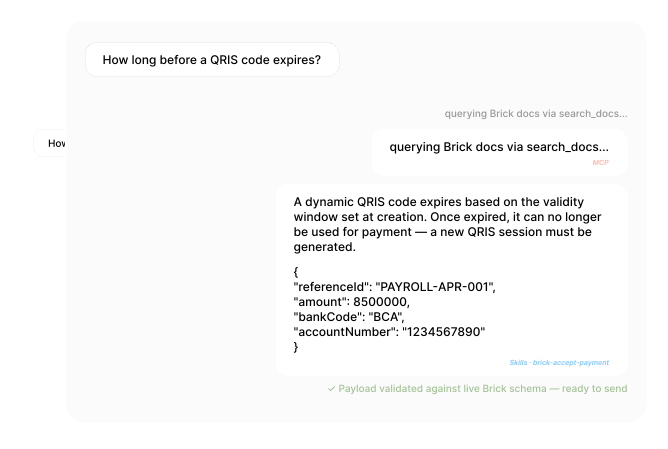
General-purpose AI tools may not know the current Brick API. Brick MCP gives them access to the published endpoint and schema information you would otherwise look up in the documentation.
Discovery & API Understanding
Which API do I need? Ask your AI — get the right answer.
Should you use BI-FAST or Regular Transfer? Bulk disbursement or single? Without structured guidance, teams waste time reviewing docs manually or relying on incorrect assumptions. With Brick MCP, AI clients retrieve structured API descriptions and clarify functional differences between products on the spot.
Endpoint Selection & Payload Preparation
Generate correct payloads. Zero 400 errors on the first call.
Incorrect request body formats, missing required fields, inconsistent field naming — these cause repeated 400 errors during sandbox testing. Brick MCP gives AI tools access to real endpoint schemas so generated payloads align with Brick's actual API format, not outdated training data.
Sandbox Testing & Validation
Validate expected parameters and edge cases before you hit them.
Repeated failures from misunderstood constraints or edge cases slow down sandbox cycles. AI can assist developers in validating expected parameters and interpreting integration behaviors — catching issues before they become blockers in production.
Error Handling & Troubleshooting
Get an error you don't recognize? Ask. Get a contextual answer.
Teams often struggle to interpret error responses or distinguish between validation issues and downstream bank behavior. Brick MCP lets AI contextualize error patterns and guide engineers toward likely causes — without opening a support ticket.
CAPABILITIES
What Brick MCP Can Do
for Your AI Assistant

Current API reference
Your assistant can look up Brick endpoints, schemas, authentication flows, and rate limits from the published API registry.

Payload guidance
Draft request bodies against documented field types, required parameters, and validation rules, then review them in your code.

Brick-specific error context
Look up Brick error codes and their documented meaning, including what to check when a request returns HTTP 422.

Product comparison
Compare documented product differences, such as when to use Dynamic QRIS or a bank transfer flow.

Supported coding assistants
Use the same MCP server with Claude Code, Cursor, GitHub Copilot, or OpenAI Codex.

A shared reference for the team
New and existing engineers can ask questions against the same published documentation.
QUICK SETUP
Connect once.
Context everywhere.
Follow the setup guide for your editor, add the Brick MCP server, and then ask questions against the published API documentation.
Install Brick MCP from the Brick docs. Compatible with any MCP-enabled editor.
Configure your editor and connect it to the Brick MCP server. The setup guide covers Codex, Claude Code, and Copilot.
Ask about the API to find documented endpoints, fields, request examples, and error details.
BRICK SKILLS · LOCAL PACKAGE
Prefer local?
Install Skills for your AI editor.
Beyond the remote MCP Server, Brick also distributes a locally installed Skills Package as a reference. Little or no setup is all you'll have: guidance for Claude Code, Codex, and GitHub Copilot.
Claude Code
Skills are packaged as .zip files and uploaded directly via Claude's UI under Customize → Skills.
Upload via Claude › Customize › SkillsOpenAI Codex
Skills are distributed as .zip files. Extract each skill package and copy the Codex target directory to ~/.codex/skills/.
Install to ~/.codex/skills/GitHub Copilot
Skills are distributed as .zip files. Extract and copy to your repo's .github/ directory — installs instructions, prompts, and agent skill folders for Copilot and VS Code agent mode.
Install to .github/ in your repoUseful context, with clear boundaries
Brick MCP supplies product and API documentation to a supported AI assistant. It does not call Brick APIs, access your account, or change your code.
Review the Capability Constraints page in the docs to understand exactly what Brick MCP can and cannot do before starting.
What Brick MCP does
- Provides live Brick API context to AI assistants
- Delivers correct request/response schemas with validation rules
- Maps error codes to specific causes and resolution steps
- Provides endpoint selection and product comparison context for architectural decisions
- Supports integration decision-making
What Brick MCP does not do
- Execute API calls on your behalf
- Access your Brick account or transaction data
- Modify your codebase
- Replace testing in Brick's sandbox environment
Keep the Brick API reference close to your code
Read the setup guide to connect a supported coding assistant, or talk to our team about your integration.