Brick QRIS API
Accept QRIS payments with dynamic or reusable codes
Use the QRIS API to create a dynamic code with a predefined amount for each transaction, or use a reusable static code for payments where customers enter the amount.
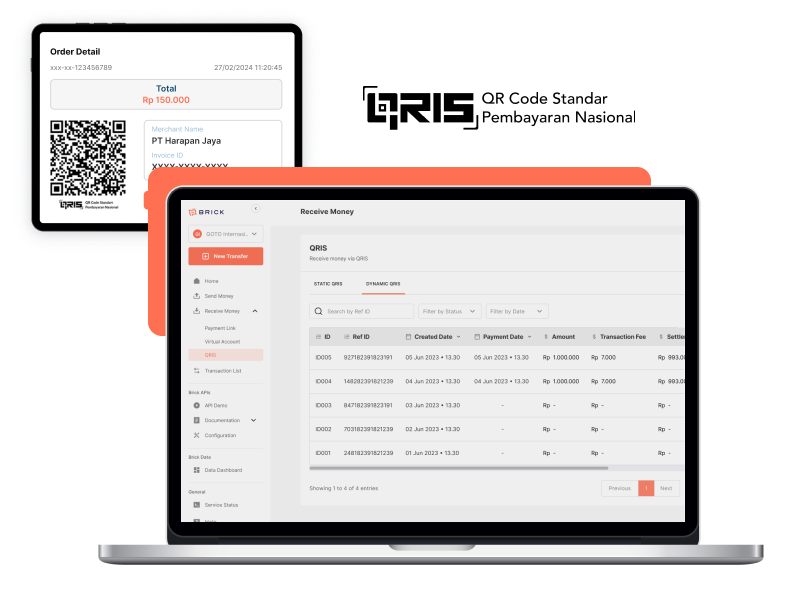

Our Solution
Choose the QRIS flow that fits each payment journey
Dynamic QRIS gives each integrated transaction its own predefined amount and payment reference. Static QRIS provides one reusable code for locations or workflows where customers enter the amount after scanning.
Dynamic & Static
Choose the QRIS workflow that fits the transaction
QRIS Dynamic is created through the API with a predefined amount for each transaction. QRIS Static uses one reusable code for customer-entered amounts.
| QRIS Static | QRIS Dynamic | |
|---|---|---|
| Setup workflow | Present one reusable code for payments where customers enter the amount. | Create a unique QRIS payment through the QRIS API for each transaction. |
| Amount handling | The customer enters the payment amount after scanning the reusable code. | The business defines the amount when creating the QRIS transaction. |
| Advantage | Reusable code; customer enters the amount | Unique code with a predefined amount |
QRIS Static
Setup workflow
Present one reusable code for payments where customers enter the amount.
Amount handling
The customer enters the payment amount after scanning the reusable code.
Advantage
Reusable code; customer enters the amountQRIS Dynamic
Setup workflow
Create a unique QRIS payment through the QRIS API for each transaction.
Amount handling
The business defines the amount when creating the QRIS transaction.
Advantage
Unique code with a predefined amountWhere businesses use Brick QRIS

Food Service Providers
Use dynamic QRIS for order-specific amounts, or place a reusable static QRIS code at a counter or collection point.

Retail or E-Commerce
Create dynamic QRIS for online checkout and invoices, while using static QRIS where customers enter the payment amount.

Online Transportation
Use a dynamic QRIS code when the fare is defined by the system, or a reusable static code at an attended service point.
Benefit
Benefits of Brick QRIS
Two QRIS Workflows
Choose a transaction-specific dynamic code or one reusable static code for repeated use.
Familiar Scan-to-Pay Flow
Customers scan QRIS through a supported payment application and complete the amount flow selected by the business.
Trackable Payment Status
Follow the payment status from creation through completion and use the reference during reconciliation.
Flexible Amount Handling
Use a predefined amount for dynamic QRIS or let the customer enter the amount for static QRIS.
Advantages
Dynamic QRIS API
Use the API reference to create a dynamic QRIS payment and handle its status in your application.
Reusable Static QRIS
Use one reusable QRIS code for payments where customers enter the amount.
Transaction Visibility
Retain payment references and status information for operational review and reconciliation.
Integration resources
Plan your QRIS integration
Review the API reference and integration documentation, then use the registration guide to prepare for account onboarding.
Add dynamic or static QRIS to your payment flow
Choose how your business sends and receives money, connects the right integration model, and keeps transaction activity visible.