
Payroll Platforms
Manage payments for multiple client companies in a single dashboard.
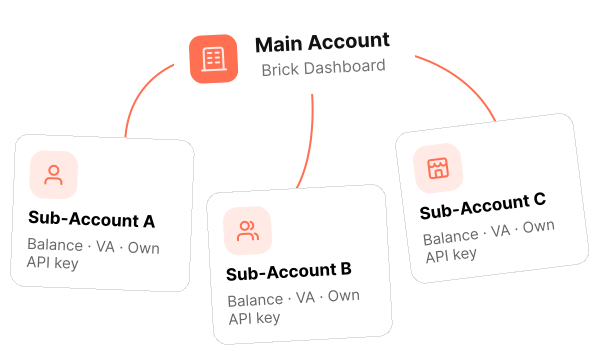
Create, manage, and secure a sub-account for every user on your platform, without repeating the same setup by hand.
Our Solution
Built for platforms serving many end users, where data, balances, and API credentials need to stay truly separate from one another.
Manage payments for multiple client companies in a single dashboard.

Onboard every new user as an independent sub-account, instantly.

Keep every merchant or branch's transactions separate, with no overlapping data.
How It Works
Switch between the main account and any Sub-Account from the dashboard. The active account determines which balance, transaction history, and configurations you see.
Open the account switcher in the top-left corner.
View data and manage operations for the selected account only.
Move between accounts without leaving the Brick Dashboard.
Sub-Account Types
Every sub-account can be set as Full-Access or Ledger-Only, depending on whether the client needs their own API credentials or just needs
to transact through the dashboard.
For clients who need their own API integration
 Has its own client_id & client_secretActivates after KYB verificationKey status is controlled by the main account
Default when a sub-account is first created
 No direct API accessCan still transact via the dashboardCan be upgraded anytime
Function
Create a sub-account programmatically with a single API call.
client_key & client_secret are generated and encrypted automatically.
Regenerate credentials if they're suspected to be compromised or have expired.
Every request is verified against the public key you uploaded.
Security & Authentication
Not an add-on—encryption and signature verification are built into every request by default.
Every request is signed and verified for authenticity.
All API credentials are encrypted before being sent.
Brick never receives your private key.
Developer Preview
Request — Create Subaccount

POST /v2/payments/general/b2c/sub-accounts
X-Signature: 8f2kL9pQr...
X-Timestamp:
2026-07-14T10:17:19+07:00
{ "name": "PT Contoh Klien",
  "subAccountCode": "CLI01",
  "email": "finance@contoh.co.id" }
Response

{ "status": "approved", "apiKey": {
  "clientKey": "enc_9x7...a2f",
  "clientSecret": "enc_k1p...93b" } }
Developer Resources
Overview & core concepts
Onboarding flow & key features
How to sign requests with HMAC-SHA512
Upload your public key
Full endpoint reference
Rotate sub-account credentials
The access token or Bearer token you sent is invalid or has expired.
The sub-account code you used already exists—try a different, unique code.
You need to upload your public key via the Setup Public Key API before creating a sub-account.