Accept more payment methods. Leave the checkout UI to Brick.
Your backend creates each session through the API, while Brick hosts the interface for QRIS, virtual account, and e-wallet payments. Manage branding in the dashboard, then share the checkout link through your website, chat, invoice, or support channel.
OUR SOLUTION
One API-created session,
one hosted payment experience.
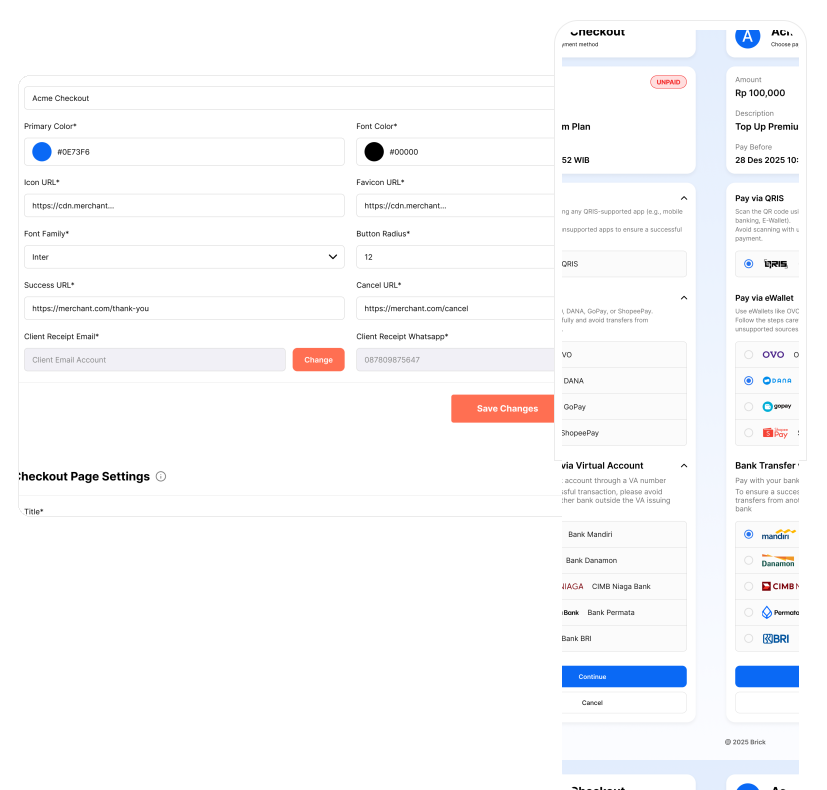
Your backend drives session creation through the API. Brick hosts the payment interface, while branding, redirects, callbacks, and page settings remain manageable from the Brick Dashboard.
Your Backend Controls
Transaction-specific session logic — handled entirely from your backend code.
- Generate a public access token per session
- Create a checkout session via API — receive a checkoutUrl
- Redirect or share the checkoutUrl with your customer
- Store the transaction referenceId for reconciliation
- Receive payment callbacks to your configured webhook
- Check status anytime via the Checkout Status endpoint
Brick Dashboard Controls
Merchant-level configuration managed from Settings › Checkout — no code changes needed.
- Page title, primary color, font color & family
- Logo URL and favicon
- Success URL and Failed URL (redirect after payment)
- Receipt delivery (email and WhatsApp)
- Published Key for frontend initialization
- Allowed domains for embedded checkout flows
HOW BRICK CHECKOUT PAGE WORKS
Configure once. Create sessions per transaction.
Configure in Dashboard
Set branding, redirect URLs, and receipt settings once in Settings › Checkout. These apply to every checkout session going forward.
Create a Session via API
Your backend generates a public access token, then calls the Create Checkout Page Session endpoint. Receive a checkoutUrl in response.
Share & Receive Callback
Redirect your customer to the checkoutUrl or share it via chat, invoice, or support. Brick sends a real-time callback when payment completes.
Examples of Using Brick Checkout Page

Web Commerce
Redirect buyers to Brick Checkout after order confirmation. No custom payment UI — Brick handles the full selection and confirmation experience.

Chat & Messaging
Share a checkoutUrl directly in WhatsApp, Telegram, or in-app chat. Customers pay without leaving their conversation context.

Invoice Payments
Embed or link a checkout session in digital invoices. Customers pay on their own time — Brick handles status tracking and callbacks automatically.

Customer Support
Support agents can generate and share a checkout link on the spot — no engineering involvement needed per transaction.
OUR SOLUTION
Two endpoints.
Complete checkout flow.
Checkout Page is powered by two endpoints. Use Create Checkout Page Session to generate each transaction's checkout URL, and Checkout Status to retrieve payment state at any time — in addition to the real-time callback.
Create Checkout Page Session
Generate a new checkout session for a transaction. Returns a / checkoutUrl to redirect or share with the customer.
Get Checkout Status
Retrieve the latest payment status for a checkout session. Use alongside callbacks for complete status coverage.
# Checkout Page uses different credentials
# for different layers of the integration
Published Key
Loads merchant checkout config (safe for frontend)
Client ID + Client Secret
Used to generate a publicAccessToken
publicAccessToken
Authorizes Create Session & Checkout Status
⚠ Never expose Client Secret in frontend code
Use redirect URLs for UX only — always rely
on callbacks for payment confirmation
✓ See full details in Configuration & Implementation
PREREQUISITES
What you need before integrating.
Ensure these are in place before calling the Checkout Page API in production.
Verified Brick Account + Active Dashboard
A completed KYB (Know Your Business) verification and an active Brick Dashboard account. Production API access is only enabled after KYB approval.
→ Configuration › Verify Your Account (KYB)API Credentials (Sandbox or Production)
Your Client ID and Client Secret from Configuration › API Credentials. Credentials are environment-specific and cannot be mixed between sandbox and production.
→ Configuration › API CredentialsCallback URLs Configured in Dashboard
The relevant callback URLs must be set in your Brick Dashboard before going live. Payment confirmation should always rely on callbacks — not redirect URLs alone.
→ Configuration › Callback URLCheckout Page Branding Configured
Set your page title, brand colors, logo, and redirect URLs in Settings › Checkout before creating your first session. These apply to all sessions until changed.
→ Configuration › Verify Your Account (KYB)Settlement: Payments are settled into your Brick account balance once the settlement time has been fulfilled. Redirect URLs are for UX only — always confirm payment status via callbacks or the Checkout Status endpoint.
BENEFIT
Benefits of Using Brick Checkout Page
Ensure these are in place before calling the Checkout Page API in production.

Go Live Without Building a Payment UI
No design sprint. No frontend sprint. The payment selection, confirmation, and method-handling UX is already built. Integrate one endpoint, redirect your customers, and you're live.

Branding You Control from Dashboard
Update your page title, colors, logo, and redirect URLs at any time from Settings › Checkout — no code change or redeployment required.

Share via Any Channel
The checkoutUrl is a standard URL — share it through web redirects, chat, WhatsApp, email invoices, or customer support flows. It works wherever a link works.

Real-Time Payment Confirmation
Every successful payment triggers an immediate callback to your configured webhook URL. No polling. No delays. Fulfil orders as soon as payment is confirmed.

Bank-grade Security by Default
SSL encryption, session-scoped tokens, and amount tampering protection are all built into Brick Checkout Page. Compliance without extra engineering effort on your end.

Automatic Reconciliation in Dashboard
All Checkout Page transactions are recorded in Brick Dashboard with your referenceId. Filter, export, and reconcile without manual tracking.
Integration resources
Plan your Checkout Page integration
Review the API reference and integration documentation, then use the registration guide to prepare for account onboarding.
Build your first checkout session
Checkout Page becomes available after your Brick account is verified and active.